Free Printable Office This or That Game
Jump to downloadA gentle icebreaker with twenty everyday choices. No personal disclosures, props or elaborate preparation.
What is included
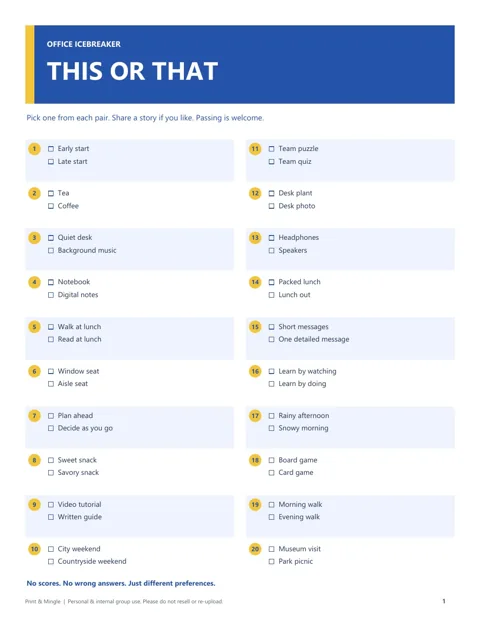
Office this or that is a one-page printable containing 20 pairs of everyday preferences. Download either A4 or US Letter; both contain the complete activity. Suggested use is a group of 4–20 people for approximately 10–15 minutes, although a five-question opening can be much shorter. These are planning suggestions, not a guarantee about how any particular team will respond.
The sheet includes tea or coffee, notebook or digital notes, a team puzzle or team quiz, and other light choices. It works as a meeting opener, a welcome activity or a short break during an internal team event. It is not a personality assessment or a way to judge how someone should work. The printed pairs are conversation starters, not labels to attach to colleagues.
Choose a participation method first
Print one sheet for a facilitator if you will read every pair aloud. Print one per person if participants should mark choices privately or refer back to earlier questions. Pens are optional for a spoken round. Before starting, choose two clear signals: one hand for the first option and two hands for the second, for example. Say explicitly that “both,” “neither” and passing are allowed even though the sheet presents pairs.
Keep participants seated if moving around would create an accessibility barrier or interrupt the room. A show of hands, a spoken response or a chat message is enough. Do not require camera use, standing on a particular side of a room, or explaining a choice in front of a manager. The simplest format is usually the easiest for a mixed group to join.
Run the first round
Read a pair aloud, give everyone a moment to decide, then ask for the chosen signals at the same time. Acknowledge the range of answers without declaring either side better. Invite a volunteer to add a sentence about their choice, then move to the next pair. Skip the explanation when the meeting is short. You can use all 20 choices or stop after a preselected set.
For example, read “Video tutorial / Written guide.” After the group signals, a volunteer might say they like written steps because they can scan them. Another may prefer seeing a demonstration. A neutral follow-up is “Does that change when you are learning something unfamiliar?” Do not turn those answers into decisions about mandatory training formats or individual performance.
Protect the low-pressure tone
Preferences can depend on circumstances. A question about lunch, travel or desk setup may touch on cost, disability, caring responsibilities or access to a workspace. Accept an answer as given and avoid asking why someone cannot choose the more popular option. Passing should receive the same calm response as either choice. If a pair does not suit your group, move to the next line.
A facilitator can model flexibility by saying that their own answer changes from day to day. Avoid comments such as “the productive people chose mornings” or “real team players prefer quizzes.” Those interpretations add judgments that the printable does not support. Never collect named answers for an employee file or describe the activity as a validated measure of personality, wellbeing or team compatibility.
Remote, hybrid and larger-group options
For a remote group, read the pair and let people type the first or second option in chat, use available reactions, or answer aloud. Explain the mapping before beginning so nobody has to guess what an emoji means. In a hybrid meeting, read in-room responses aloud too; remote colleagues should not have to infer the result from a camera view of the table.
For more than twenty people, run a quick group signal and invite only two voluntary comments per question. For a newcomer welcome, use pairs for a short conversation with a colleague, then invite people to share their own choice rather than reporting someone else’s preferences. A quieter version allows each person to mark five choices and discuss only one they want to share.
Scoring, closing and printing
There are no correct answers and no standard score. Do not eliminate minority choices or announce a winning team. To close, invite an optional observation about an unexpected shared interest, such as a museum visit or a board game. Keep the debrief short so the activity remains an opener rather than taking over the meeting. Participants may leave their sheets unmarked or take them away.
Print portrait, single-sided, at actual size using the edition matching your paper. Check a single copy for readable text and complete page edges before printing a full set. The blue and yellow design is optional for play; a grayscale office print still carries all twenty pairs. You need no scissors or additional equipment. Use copies for your own internal workplace activities and share the article link when another organizer wants the file.
Download The Printable
Free 1-page PDF. Choose your paper size.
US Letter PDF A4 PDFPersonal gatherings and internal group use. Please do not resell or re-upload the files. Usage terms
Original AI-assisted material, checked digitally. No in-person playtest or physical print test; timing is suggested.